


AI in Outbound Sales: What Worked and What Flopped in 2026
TL;DR: What we learned from using AI in outbound sales in 2026
- AI worked best on repetitive tasks. Reply handling, list QA, and reporting were some of our strongest use cases. ⚙️
- Reply handling was our biggest win. Weekly review dropped from 8-12 hours to 2-3 hours. 📩
- AI made list QA significantly faster. A 5,000-contact list went from 6-8 hours to around 45 minutes of review. 🔍
- AI-written copy underperformed. Our best AI version reached 1.8% replies vs 2.6-3.2% for human-written copy. ✍️
- AI personalization also fell short. Personalized openers reached 1.4% replies vs 2.8% for our standard opener. 🧪
AI found its way into almost every part of outbound prospecting in 2026 - prospect research, personalization, copywriting, list building, reply handling, campaign analysis.
We tested AI across many of them.
Some became part of our day-to-day workflow. Others looked promising internally but did not hold up once we put them in front of real prospects.
And a few taught us that being able to automate a task does not necessarily mean we should.
In this article, we'll break down what we kept, what we dropped, and where we still keep humans firmly in the loop, including the campaign numbers behind those decisions.
What AI outbound tactics did we keep, drop, or keep human-led?
After testing AI across different parts of our outbound process, we did not end up with a simple list of tools we liked and disliked.
Some applications became part of our regular workflow. Others were useful only with a human making the final call. And a few experiments performed poorly enough that we stopped using them.
Here is where the main use cases landed:
The distinction matters because “we use AI” can describe very different levels of automation.
In some parts of the workflow, AI now handles most of the repetitive work. In others, we use it to surface information while a GTM still decides what happens next. And for some tasks, the test results gave us little reason to keep using it at all.
Which AI use had the biggest impact on our outbound workflow?
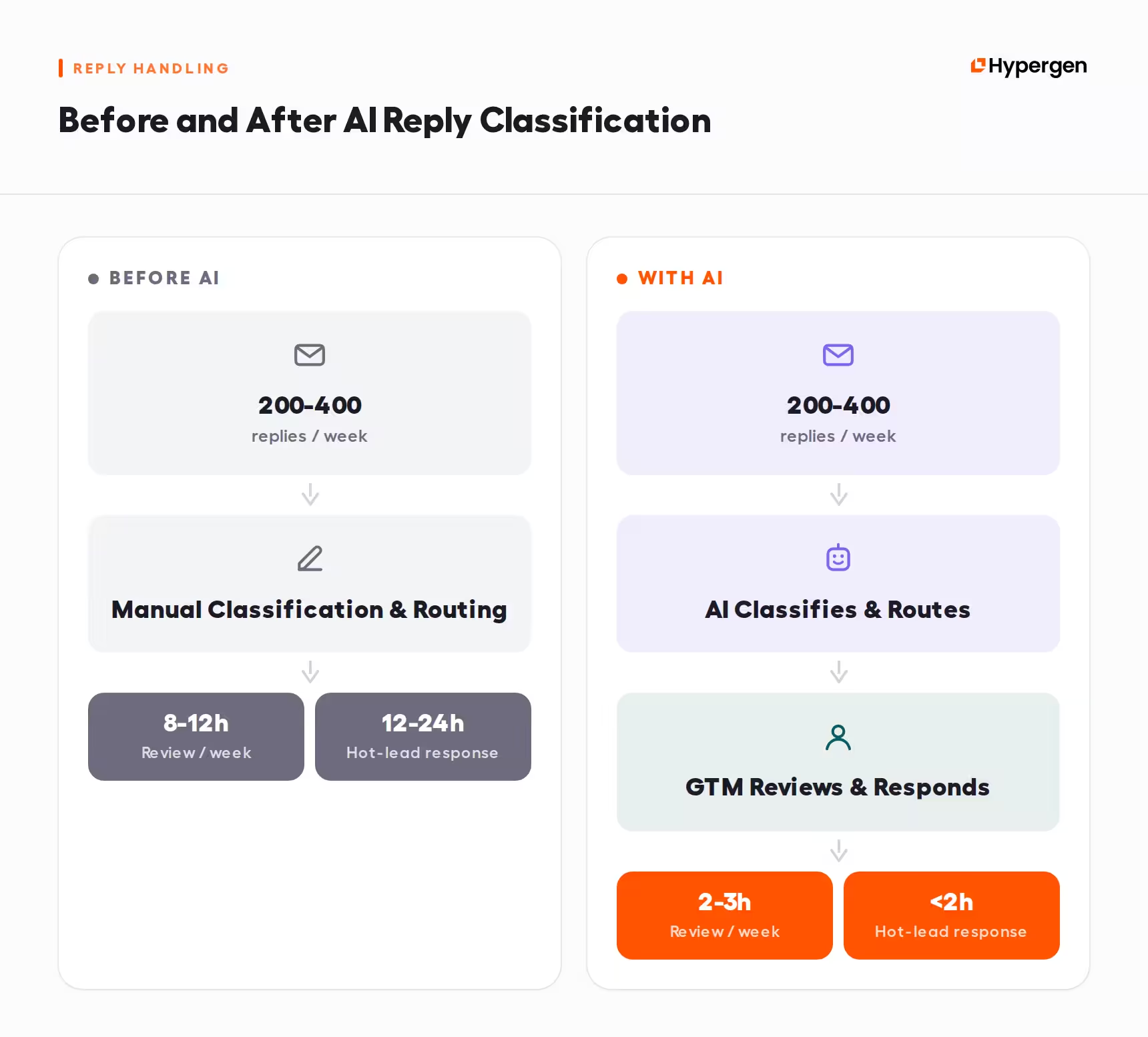
One of our biggest AI wins in 2026 was reply classification and routing.
Across six clients, one GTM could be dealing with 200-400 inbound replies every week.
Before we introduced AI into the process, those replies had to be reviewed manually: identifying high-intent prospects, separating timing objections from flat rejections, routing meeting requests, and flagging wrong-person or out-of-office responses for follow-up.
That took around 8-12 hours of manual work per week. More importantly, a high-intent reply could sit in the queue for 12-24 hours before someone responded.
We built an AI classifier to handle the first pass. It reads each reply and classifies it by intent, then routes it into the appropriate next step. Meeting requests go directly to the scheduler, while wrong-person and out-of-office replies are separated for batch processing instead of taking up individual GTM review time.
What changed:
- GTM review time dropped from 8-12 hours to 2-3 hours per week
- response time for high-intent leads went from 12-24 hours to under 2 hours
- meeting booking rate increased by 15-20% during the same period
The important part is what AI is doing here. It is not deciding how we should respond to a prospect or changing the campaign strategy. It is removing the manual sorting that happens before a GTM can act.
Why did AI list auditing become part of our workflow?
We were initially skeptical about using AI for list QA. The concern was simple: if it flagged too many false positives, GTMs could end up spending as much time reviewing the AI output as they had spent checking the list manually.
Once we tested it, the review workload dropped substantially.
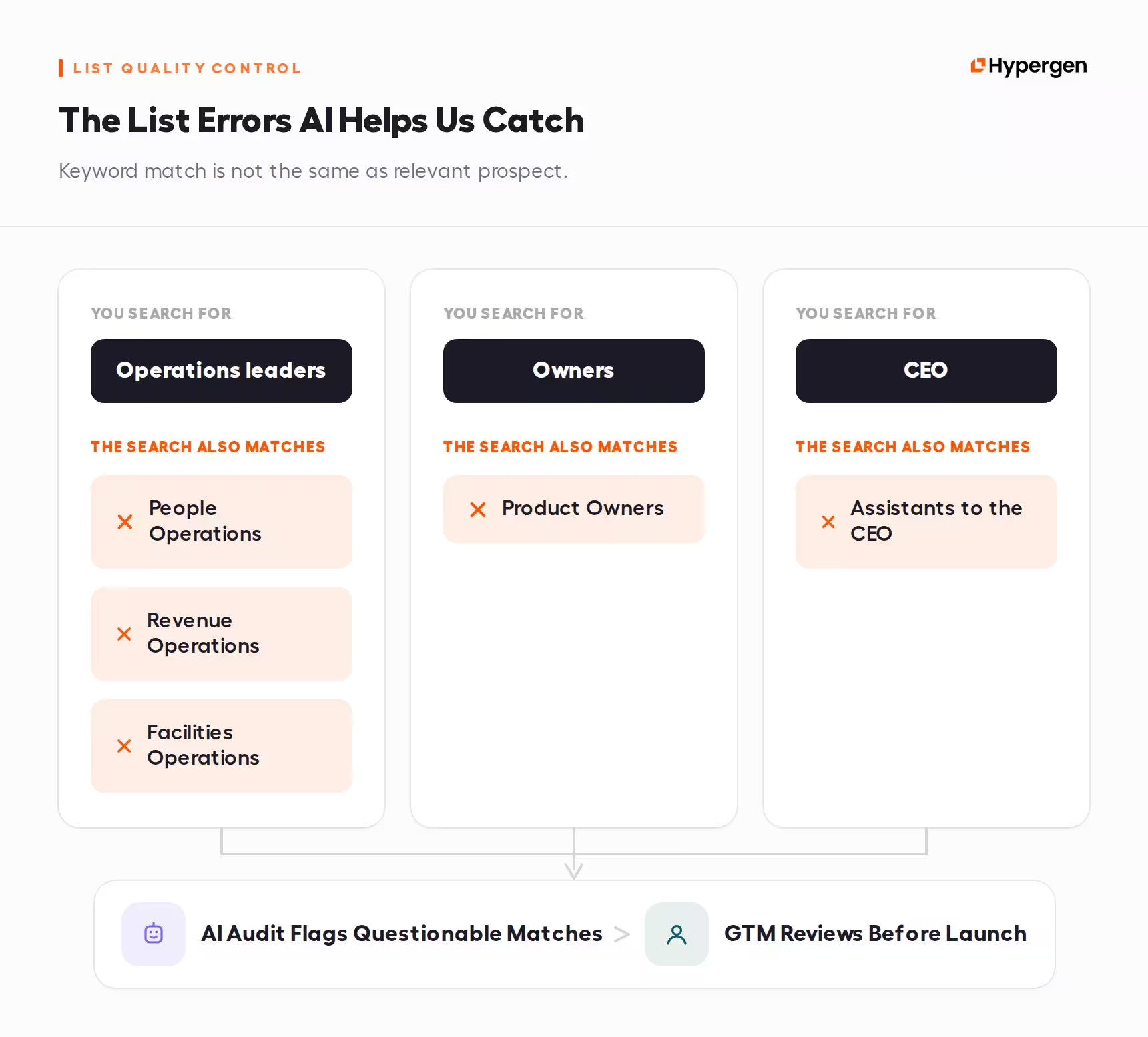
Instead of manually spot-checking enriched records, AI now audits the full list and flags the contacts that need another look. That includes mismatched job titles, questionable company data, and records where the enrichment does not line up with the information available on LinkedIn.

A 5,000-contact list that previously took 6-8 hours to QA now requires around 45 minutes of GTM review on the flagged records.
Across the lists where we introduced this process, we also saw bounce rates move from 4-6% to 1.5-2.5% and wrong-person replies from 18-22% to 10-12%.
The mistakes are not always obvious
Keyword-based prospecting can produce contacts that technically match the search but make little sense once someone looks at the role in context.
For example:
- searching for Operations leaders can also pull People Operations, Revenue Operations, or Facilities Operations
- searching for Owners can bring in Product Owners
- targeting the CEO can still surface Assistants to the CEO
AI gives us a way to run those checks across the entire quality lead list for cold emailing instead of relying on a human to spot-check a small sample. Every record goes through the audit, while GTMs only review the flagged subset before launch. This is now a mandatory step in our list QA process.

The value is not removing humans from list QA. It is changing what they spend their time reviewing. Instead of manually checking thousands of records, they can focus on the smaller subset where the data looks inconsistent.
How did AI change the work happening behind our campaigns?
Some of the AI workflows we kept never touch a prospect directly. They sit behind the campaign, helping us turn client information into usable campaign input and making performance easier to track once outreach goes live.
Turning discovery calls into campaign input
A 45-minute discovery call can contain dozens of details we need later: ICP information, objections, buying triggers, and customer outcomes that could become proof in the messaging.
We use AI to make that information easier to work with. After the call, it reads the transcript and extracts the relevant ICP details, objections, and potential proof into a structured brief.
The initial AI pass takes around 90 seconds. GTMs previously spent 20-30 minutes per call writing intake notes. Now they spend around 5 minutes reviewing and editing the output.
The GTM still reviews the brief and decides which insights are worth carrying into the campaign.
Giving clients a live view of the campaign
Reporting was another workflow we had wanted to improve for years.
Weekly and monthly reports gave clients the numbers and our analysis, but we wanted one place where they could also see:
- live campaign analytics
- context and next steps
- CRM deal progression and booked calls
- performance by copy, industry, company size, and job title
We had previously invested in developer-built solutions without getting the result we wanted. In 2026, connecting data from our tools through MCPs and adding GTM context made the workflow much more practical, giving clients a live view of what is running, what is coming next, and how the campaign is progressing without relying on constant manual updates.
Why did we stop using AI to write first-touch emails?
AI copywriting was one of the most obvious use cases for us to test. We tried GPT-4 for first-touch emails, Claude for proof blocks, and o1 for subject-line variations.
The results were consistent enough that we changed how we use AI in the writing process.
What we saw:
- our best AI-generated copy reached a 1.8% reply rate, even after heavy human editing
- human-written copy using the same proof structure reached 2.6-3.2%
- the gap remained large enough that we stopped using AI to generate first drafts
The issue was not whether AI understood how to write high-converting cold emails at a structural level. It could follow the structure, keep the message concise, and incorporate the information we gave it.
Where it struggled was deciding what deserved emphasis.
AI drafts tended to default to safer, more explanatory language. Our human-written versions were more likely to lead with a specific outcome or proof point that gave the prospect an immediate reason to keep reading.

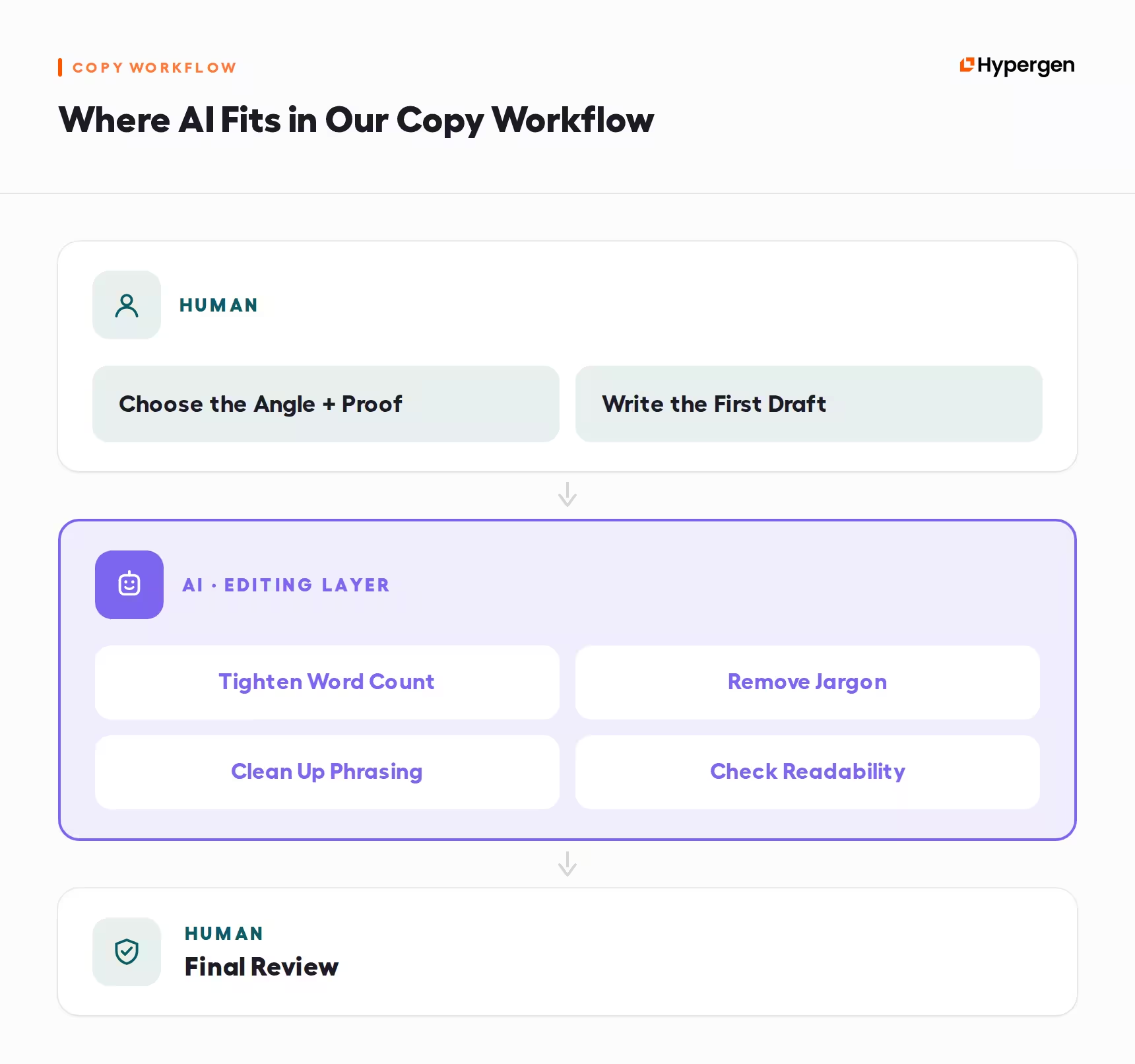
We now write the first draft ourselves and use AI later in the process to tighten the word count, remove jargon, clean up phrasing, and check readability. The angle, proof, and first draft stay human-led.
Why did AI personalization at scale underperform?
Cold email personalization was another use case that looked promising on paper. The idea was to use AI to research a prospect's LinkedIn activity and generate a unique first line for each message.
We tested it across 2,000 sends.
The result:
- AI-personalized opener: 1.4% reply rate
- standard proof-driven opener: 2.8% reply rate
- both approaches were tested on the same list
The personalized openers were factually accurate. The problem was that they often sounded generically enthusiastic. AI could identify something a prospect had posted or engaged with, but the observation itself rarely gave the message a stronger reason to exist.
Personalization becomes useful when the observation is specific and non-obvious enough to change the conversation. Simply proving that we researched the prospect is not enough. In this test, AI could personalize at scale, but the standard proof-driven opener still produced twice the reply rate.
Where do we still keep humans in control?
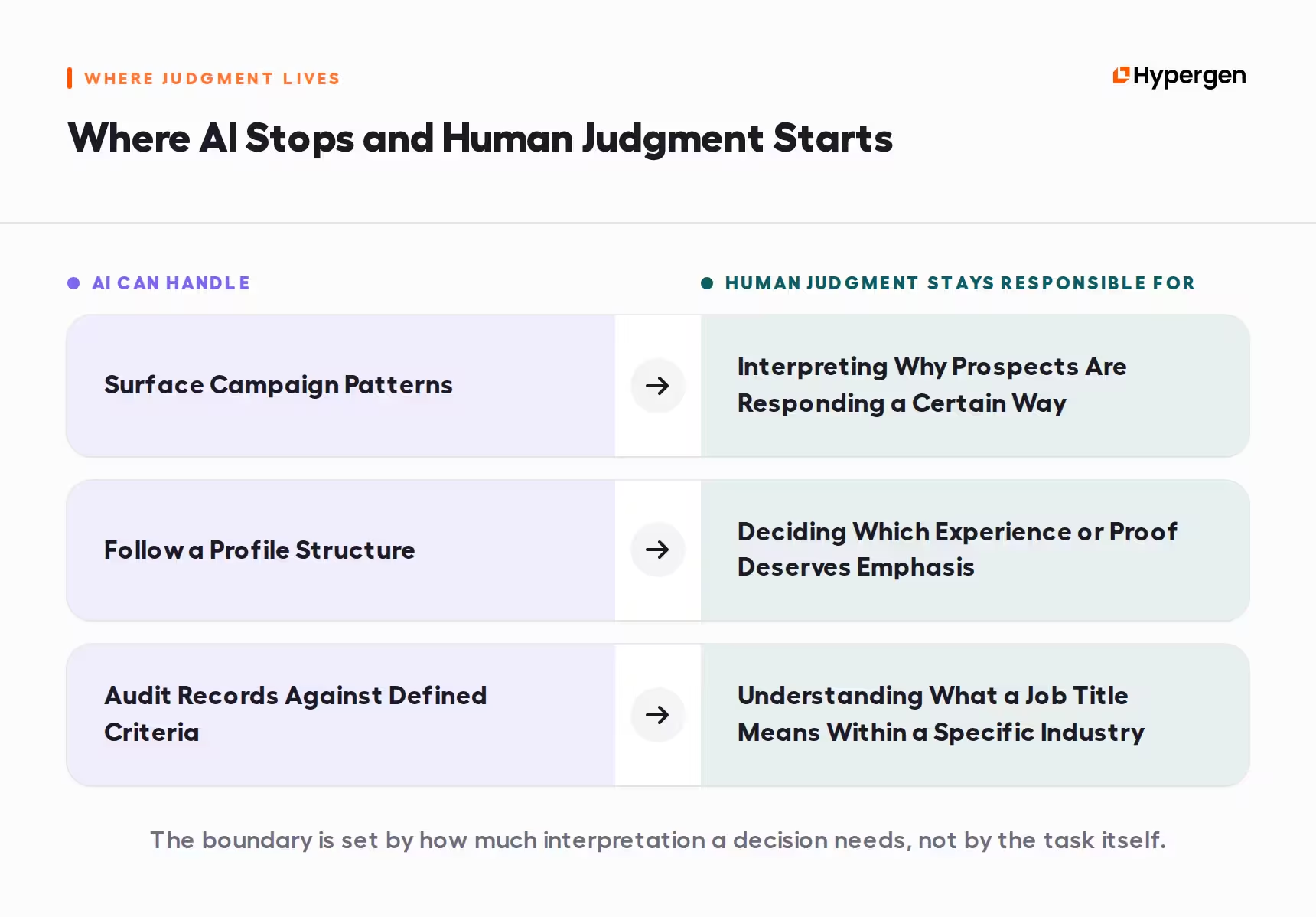
The clearest limitations appeared when AI had to move beyond processing information and interpret what that information meant for the campaign.
We saw that in three areas: strategy pivots, LinkedIn profile rewrites, and list building.
Campaign strategy needs context
We tested an AI recommendation engine that read campaign metrics and suggested potential pivots. It was good at spotting straightforward problems, such as a high bounce rate pointing to a list issue.
The harder cases were much less reliable.
A campaign might receive several replies saying the timing was wrong. AI could interpret that as a weak angle and recommend changing the campaign. A GTM reading the actual replies might see something different: the prospects were relevant and interested, but the timing was off.
After three months, we turned the recommendation engine off because it was producing too many false-positive strategy pivots. We still use AI to surface patterns in campaign data, but the GTM interprets those patterns and decides whether the campaign actually needs to change.
LinkedIn profiles need judgment about what matters
We saw a similar limitation when testing AI-generated LinkedIn profile rewrites.
AI could follow the structure we gave it, but it tended to flatten the details that made the person credible. Specific operator experience or proof could become generic language about being an "experienced M&A advisor."
Across 12 accounts, we saw:
- profiles before the rewrite: 15-17% acceptance rate
- AI-rewritten profiles: 13-15%
- human-rewritten profiles: 18-22%
The challenge was not following the profile structure. It was deciding which detail deserved emphasis and which could be removed. That judgment still stays with the team.
List building still needs domain knowledge
This is also why we distinguish between AI list auditing, which we kept, and unsupervised AI list building.
In one healthcare campaign, AI built a list of 10,000 contacts and included VP Operations roles at hospital systems. On paper, the titles matched the targeting criteria. In context, many of those roles were responsible for facilities and logistics rather than vendor purchasing.
The result was a 28% wrong-person rate in the first week. We paused the campaign after 1,500 sends, manually re-filtered the list, and relaunched it. The human-QA version recorded an 11% wrong-person rate.
AI can audit thousands of records against criteria we have already defined. We are much more cautious about asking it to decide what those criteria should mean in a specific market.
When does AI become too expensive for outbound?
The expense is rarely just one software subscription. Depending on the workflow, we were paying for:
- tool seats and LLM credits
- signal monitoring
- personalized copy and opener generation
- website and case study scraping
- additional usage as campaign volume increased
When that usage was not monitored closely, the additional cost could run into thousands of dollars per client.
We compared those costs with what each AI application was actually producing. That pushed more of our investment toward the tools the team was already getting value from and away from expensive experiments such as AI-generated personalization that had not improved our lead rates.
That is also why some of the less glamorous AI applications stayed. Reply classification and list QA solved expensive operational problems, while personalization and copy generation added usage costs without producing better results in our tests.
What did a year of AI testing teach us?
After a year of testing AI across outbound, the pattern became clearer.
The applications we kept tend to have clear inputs, repeatable rules, and a defined output. Reply classification, list auditing, transcript processing, and reporting all fit that description.
The applications that struggled asked AI to make a different kind of decision.
Which proof point matters most?
Is this prospect actually relevant?
Does this campaign need a new angle?
Is this observation interesting enough to lead with?
Those decisions require context that is difficult to reduce to a set of instructions.
The most useful role for AI in our outbound process is handling work that happens around the decision, so our GTMs can spend more time making the decision itself. That is the line we now use when deciding where to test AI next.
A year of testing made us less interested in how much of outbound AI can automate, and more interested in which parts are actually worth automating. In 2026, that turned out to be a much more useful question.


Frequently asked questions
It can, but the impact depends heavily on where it is used. In our 2026 tests, some of the strongest results came from operational workflows such as reply classification and list QA. Reply review dropped from 8-12 hours to 2-3 hours per week, while list QA for 5,000 contacts went from 6-8 hours to around 45 minutes of GTM review. Other applications, including AI-generated copy and personalization, underperformed our existing approach.
For us, the AI applications worth keeping are the ones that handle structured, repeatable work with clear inputs and outputs. That includes reply classification and routing, list auditing, discovery call processing, and live client reporting. The specific tool matters less than whether the workflow saves meaningful manual work or improves how quickly and accurately the team can act.
It did in our tests. Our best AI-generated copy reached a 1.8% reply rate after heavy human editing, compared with 2.6-3.2% for human-written copy using the same proof structure. We still use AI during editing to tighten copy, remove jargon, and improve readability, but the angle, proof, and first draft remain human-led.
Our testing points more toward changing what SDRs/GTM teams spend their time on than removing human involvement from outbound. AI can take over repetitive work such as classifying replies, auditing records, and processing transcripts. Decisions that require context, domain knowledge, or judgment, including strategy pivots, targeting decisions, and choosing what proof deserves emphasis, still remain human-led in our workflow.
We would be cautious with fully AI-generated first-touch copy, personalization at scale, unsupervised list building, and automated strategy pivots. Each created a different problem in our testing: weaker reply rates, generic personalization, targeting errors, or recommendations that missed important campaign context. AI can still support parts of these workflows, but we would not hand them over end-to-end based on what we saw in 2026.
Don’t miss these

.avif)

Get your first lead this month
14 days to get started. 7 days to get your first lead on average.


