

How to use Clay for data enrichment to generate leads
TL;DR: Clay for data enrichment explained
- Clay data enrichment transforms static lead lists into dynamic, signal-driven prospecting systems. It reveals not just who to contact, but when and why.
- Traditional enrichment leaves data gaps 📉 Single providers often return only 60–75% match rates, limiting outreach effectiveness.
- Waterfall enrichment solves coverage 🧩 Sequentially querying multiple providers increases match rates to ~95–98% while reducing cost.
- Claygent adds real-time research 🤖 AI-powered enrichment surfaces funding events, hiring signals, and company changes automatically.
- Intent signals drive timing 🎯 Behavioral data (G2, Bombora) and events (funding, new hires) identify prospects actively in-market.
- Signal stacking improves conversion 📈 Combining multiple triggers (e.g. funding + hiring + tech stack gaps) can double or triple reply rates.
- Filter before enriching 💡 Pre-qualifying your ICP reduces wasted credits by 20–60% and improves list quality.
- Automation creates leverage ⚙️ Enriched data flows directly into CRM and outreach tools, reducing manual work by up to 80%.
- Personalization becomes scalable 📬 Research-driven emails achieve ~10–25% reply rates vs ~5–9% for generic outreach.
Most B2B teams do not have a lead generation problem. They have a signal problem.
The prospects are out there, the intent is real, and the timing is often perfect. What is missing is the data layer that makes all of that visible before your competitor gets there first.
Using Clay for data enrichment is what that layer looks like in practice.
It is how revenue teams go from "we have a list" to "we know which accounts are hiring, which ones just changed their tech stack, and which ones are actively researching a solution like ours right now."
And it works whether you are enriching cold outreach lists, refreshing a stale CRM, or building account intelligence for your sales team ahead of a campaign.
So this guide covers all of it: how Clay enrichment works, how to build a workflow that produces pipeline, and where to avoid the expensive mistakes.
Let’s get into it.
What is Clay?
Clay is a data enrichment and workflow automation platform built for B2B go-to-market teams. It connects your CRM, lead lists, and LinkedIn data to 150+ integrated providers, automatically enriching contact and company records with missing contact details, firmographic context, and buying intent signals inside a single automated workflow.
Here is the core frustration Clay was built to solve: your prospect data lives across too many tools, and no single one gives you the full picture.💡
But the platform has grown well beyond basic contact enrichment since. By January 2025, Clay closed a $40M Series B expansion at a $1.25 billion valuation, off the back of 6x revenue growth in 2024, with more than 5,000 customers including OpenAI, Canva, and Anthropic.
Its product suite now spans Claygent for AI-powered research, Audiences for buyer intent detection, and Sequencer for outbound email execution.
It is, frankly, why Clay sits at the center of our signal-based lead generation infrastructure for every outbound campaign we run.
How does Clay enrichment differ from traditional data enrichment tools?
Traditional enrichment tools give you access to one proprietary database (and that is essentially where it ends). Most individual providers achieve email match rates between 60 and 75%, meaning up to 40% of your prospect records end up with data gaps when you go single-source.
Clay is architecturally different. It does not maintain its own database.
Instead, it orchestrates across 150+ independent providers, including Hunter.io, Prospeo, Dropcontact, Apollo, Crunchbase, Builtwith, G2 Buyer Intent, and Bombora.
When one provider returns nothing, the next runs automatically. That sequential logic is why Clay customers consistently report match rates above 98%.
The credit system also applies conditional logic to skip enrichment for contacts that fall outside your ICP entirely, so you only pay for data on leads worth pursuing in cold email outreach.
With that clear, let's look at how the enrichment process actually works under the hood.
How does Clay data enrichment work?
Clay's enrichment process begins with a data source and expands through a series of enrichment columns. Each column represents a specific lookup or transformation step, and records are processed row by row, with confidence scoring at each stage to show you which enrichments succeeded and which fell back to alternative providers.
Two mechanisms sit at the heart of Clay's enrichment approach, and understanding both before building will save you a meaningful amount of wasted credits. 🧠
What is waterfall enrichment?
Waterfall enrichment runs data providers in a predetermined sequence, where each one acts as a fallback only when the provider before it returns nothing. Rather than querying one database and accepting its match rate, you chain providers in order of coverage strength for your specific target market.
A typical email enrichment waterfall in Clay might sequence:
- Hunter.io first (strong US tech coverage)
- Then Prospeo (stronger in European markets)
- Then Apollo
- Then Dropcontact for records where earlier providers found nothing.
Clay handles all the cascading logic automatically.
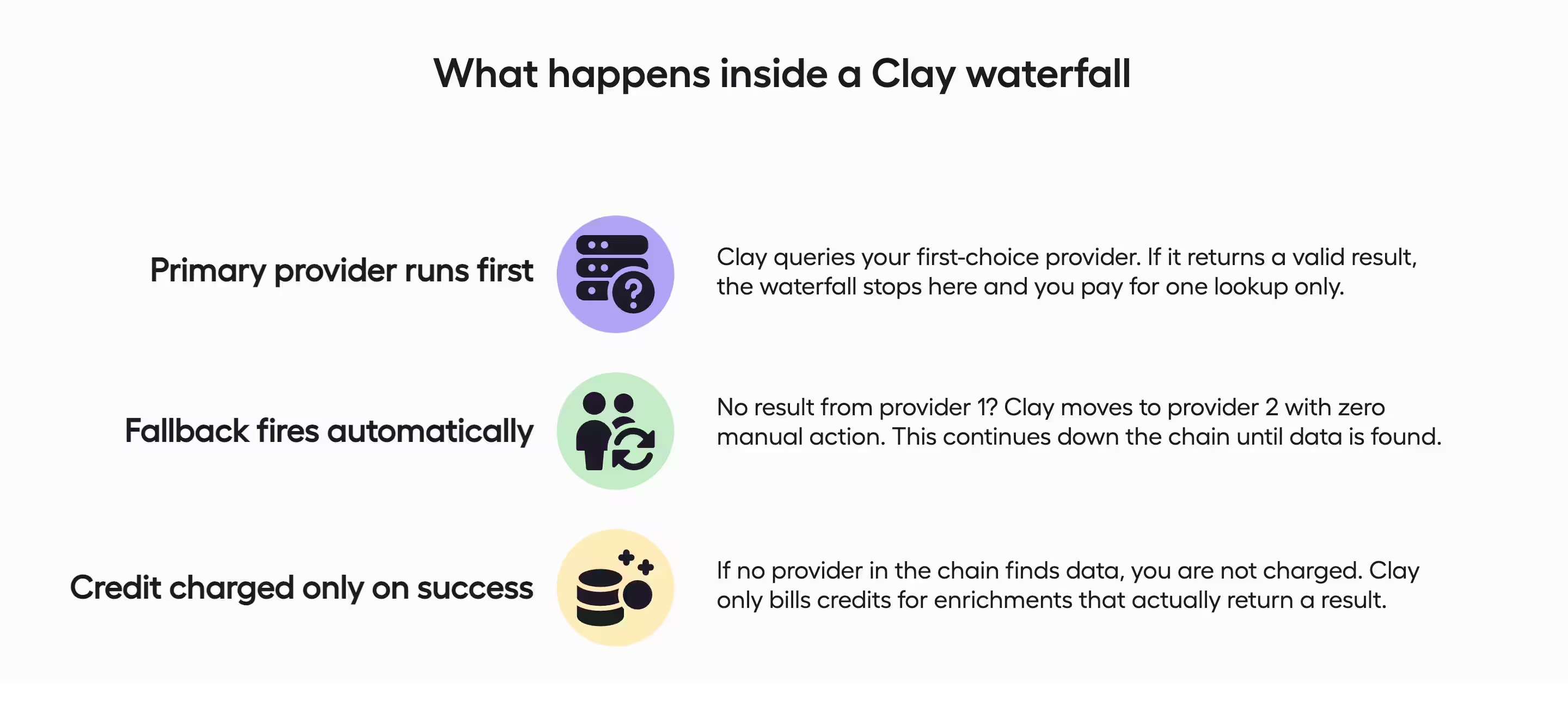
And the performance difference is significant. Single-source enrichment produces match rates between 60 and 75%. A well-configured waterfall regularly exceeds 98%.
The cost efficiency is equally compelling: waterfall enrichment typically costs 40 to 60% less than running multiple single-source lookups in parallel, because Clay only charges when data is actually found.

Prioritize your waterfall providers by running first the ones your have an API key for. Clay credits would oftentimes be more costly than grabbing a subscription for a tool you can link through an API.
What is Claygent and how does the Clay AI tool research prospects?
Claygent is Clay's AI-powered research agent, and it goes well beyond what standard enrichment APIs can do.
Where those APIs return predefined data points, Claygent accepts open-ended research instructions and autonomously searches the public web to return structured findings.
In practice, Claygent can review a company's job postings to identify active hiring priorities, pull recent press releases for expansion announcements, or extract funding details from news sources and investor databases.
Revenue operations teams use it to cut account prep time from 30 to 45 minutes down to approximately 5 minutes per account (yes, really). And the scale of adoption reflects real demand: Claygent surpassed one billion cumulative research runs in June 2025, with 30% of Clay customers using it to automate tasks that previously required dedicated SDR hours.
Claygent's scope is limited to publicly available information, and complex research tasks consume 10 to 50 credits per record, making it most economical when applied selectively to high-priority accounts.
⚠️ Claygent occasionally misinterprets web information, so treat its output as a strong starting point that benefits from a quick human review pass, not as ground truth ready to push directly to outreach.
With the mechanics covered, the more interesting question is what that enriched data actually unlocks for your sales targeting. 🎯


How does Clay data enrichment improve your sales targeting?
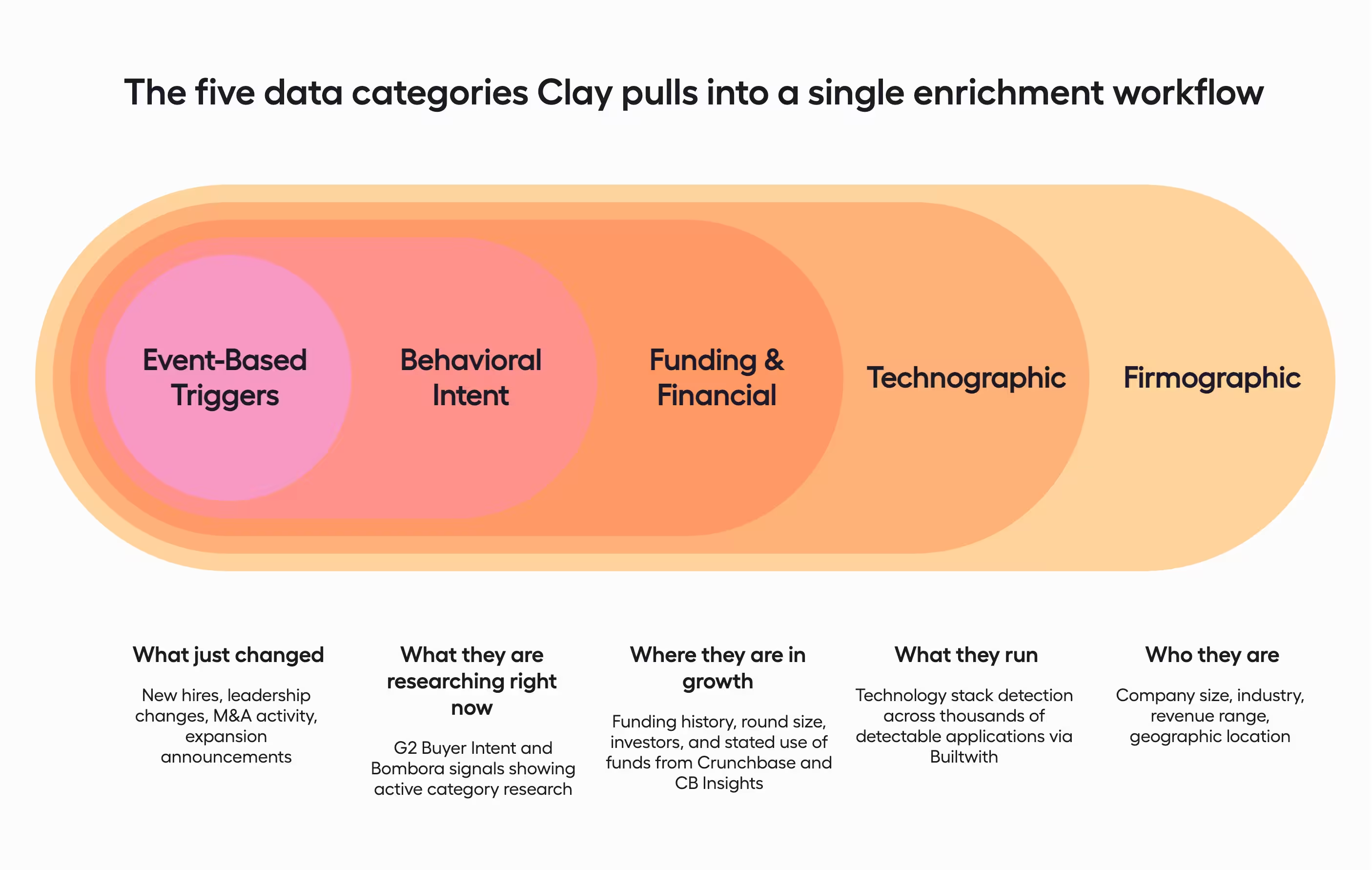
Clay data enrichment improves sales targeting by surfacing not just who a prospect is, but whether they're currently in-market. 🎯 Beyond email addresses and firmographic fields, Clay pulls behavioral signals, event-based triggers, and technographic context that reveal when and why to reach out.
Firmographic and technographic signals worth tracking
Firmographic signals are the baseline layer of any Clay enrichment workflow: company size (employee count and revenue range), industry classification, company age, and geographic location.
In Clay, firmographic and funding intelligence flows primarily from Crunchbase and CB Insights, giving you access to funding history, investor details, revenue ranges, and corporate hierarchy data.
Technographic signals go a level deeper.
They reveal which tools a company actually runs, detected via Builtwith (which identifies technology stacks across thousands of detectable applications) and confirmed through LinkedIn job posting analysis via Claygent.
Littlecode is Clay's secondary technographic integration, tracking software spend and tool adoption for accounts where Builtwith returns incomplete coverage.
All these signals combine naturally with RevOps data to create a fuller picture of where a company is in its buying cycle. Knowing a prospect actively runs a competitor's CRM gives you a very targeted entry point that firmographic data alone would never surface.
Behavioral and event-based intent signals that trigger outreach
Behavioral intent signals tell you a company is actively researching a problem or solution category right now, not six months ago.
Clay integrates two primary behavioral intent platforms:
- G2 Buyer Intent: Tracks when prospects research your product category and competitors on G2, flagging companies actively evaluating solutions within a defined buying cycle.
- Bombora: Detects website research behavior across a cooperative network of B2B sites, surfacing companies consuming relevant content at above-normal rates.
Event-based signals are a different category entirely.
These are specific company events that correlate with buying activity: new executive hires (Head of Sales, CTO, VP Revenue), recent funding announcements, department headcount growth, technology stack changes, and M&A activity. Claygent monitors all of these from public sources, flagging accounts the moment a trigger appears.
In fact, 93% of B2B marketers report higher conversion rates after incorporating buyer intent signals into their outreach. You reach out about a funding round while it's actively happening, or about a new sales leadership hire within their first few weeks.
Which signal combinations predict the highest purchase intent?
Individual signals are useful. Stacked signals are what shift a prospect from "worth contacting eventually" to "reach out now." 📬
A prospect showing a recent Series B funding announcement combined with a new Head of Sales hire and active Salesforce usage without a connected intent data platform represents a very specific, very timely opening.
Any one of those data points is interesting.
Together, they tell a clear story about where that company is in its buying cycle and what pain they are likely sitting on.
When we see a new Head of Sales hire paired with a recent CRM switch and an early-stage funding event, we route those accounts to immediate outreach. That signal combination consistently produces leads that convert to meetings and revenue at 2 to 3 times the industry average, which is the core of our B2B lead generation approach for clients across industries.
How to enrich your customer profiles with Clay (step by step)
Enriching customer profiles with Clay follows four sequential phases: filter your ICP list before spending any credits, configure a multi-provider waterfall for contact and company data, layer intent signals with Claygent on priority accounts, and automate enriched output directly into your outreach stack so campaigns launch without manual hand-offs.
Step 1: Build and filter your ICP list before you enrich a single contact
This is the step most teams skip, and it costs them a significant chunk of their enrichment budget.
Filtering must happen before enrichment, not after (not the other way around). Clay research shows teams enriching without ICP filtering waste 20-30% of their budget on leads they'll never contact.
And pre-filtering typically eliminates 20-40% of imported records before a single credit is spent. 🎯
An effective ICP filter combines three criteria types:
- Firmographic: minimum employee count, revenue range, specific industries, geographic exclusions
- Technographic: companies running specific tools, or companies missing solutions you provide
- Behavioral: companies already showing early intent signals or recently funded
For a detailed breakdown of how to source and structure that list before it ever touches Clay, check out our guide on how to build a quality lead list.

Do not enrich your full imported list before filtering. A company importing 50,000 contacts and enriching all of them to find the 5,000 good fits pays roughly 2.5x more in credits than one that filters first. Filter aggressively before running a single enrichment column.
Step 2: Configure your Clay enrichment waterfall to improve lead data quality
With your filtered list ready, the next step is configuring a waterfall that queries multiple providers in sequence, stopping as soon as it returns valid data.
The goal is near-complete coverage at the lowest possible credit cost.
Here is a a standard email enrichment waterfall, ordered by coverage strength:
- Hunter.io: excellent for US and Western Europe, particularly SaaS companies
- Prospeo: strong European coverage; GDPR-compliant by design
- Dropcontact: excellent verification and compliance; higher cost, positioned later
- Apollo: comprehensive global coverage as a mid-sequence fallback
- Snov.io or Nimbler: final fallbacks for maximum remaining coverage
For company intelligence, run a separate waterfall: Crunchbase first for funding and investor data, CB Insights as a fallback, then Clearbit or Littlecode for additional firmographic context.
Clay shows you upfront how many credits your configured waterfall will likely consume before you run it against the full list (which is quite useful when you're managing a tight credit budget).
💡 Use conditional running on your enrichments to save credits. If a company is outside your ICP by one criteria, you can avoid running enrichments for the rest.
Step 3: Layer intent signals into your Clay data with Claygent
Claygent runs after the waterfall, not instead of it, and it runs on a focused subset of records, not the full list.
Typical Claygent research tasks for this stage:
- Scraping recent news mentions for product launches, market expansion, and funding announcements
- Checking company LinkedIn pages for recent hiring activity in relevant functions
- Researching company websites for technology stack positioning and recent product changes
- Pulling founder background and investor network context from PitchBook or Crunchbase for warm introduction potential
Prompt specificity is everything here. A vague instruction like "research this company" returns unusable output.
One tip from us: write Claygent prompts like instructions to a junior researcher. Define the output format, field names, separators, and what to return if data is missing. The more specific the instruction, the more usable the structured output in your Clay table.
An effective Claygent prompt looks like this:
"Research this company's recent funding history. Extract the most recent round's announcement date, round size in millions, stage, lead investors, and publicly stated use of funds. Return each field separated by pipes."
Step 4: How to automate data enrichment for your sales outreach stack
The final step is activating your enriched records into your outbound systems automatically, and this is where the real leverage lives.
Clay's native integrations cover the major platforms:
- Salesforce and HubSpot: enriched data populates directly into contact and company records, triggering automations and enabling field-based segmentation
- Instantly, Lemlist, Salesloft: enriched prospects are automatically added to email campaigns with personalization fields pre-filled. (If you're still evaluating which platform to pair with Clay, our breakdown of the best cold email software in 2026 is worth a read).
- Webhooks via Zapier: connects Clay to any platform without a native integration
Trigger-based automation is where this step gets genuinely powerful.
When a prospect visits your pricing page, Clay retrieves additional enrichment and triggers a sequence within 24 hours. When it detects a new funding announcement, it researches the round details and prompts immediate account executive outreach.
This automation reduces manual work by 60-80% compared to manual research and list-building processes.
So you've got enriched data flowing into your outreach stack. Now let's talk about what actually makes those emails land.
How does Clay enrichment turn your lead data into personalized cold email outreach?
Personalized cold emails referencing specific recent information achieve reply rates of 10-25%. Generic emails average 5-9% reply rates. So the difference is obvious.
The historic constraint was always time and scale; a rep could spend 30-45 minutes researching one prospect for strong response rates, but that doesn't scale beyond a handful per week. Clay resolves that trade-off by enabling research-quality personalization at high volume.
📚 If you want to dig into the copy side of that equation, our guide on how to write high-converting cold emails covers exactly what goes into messages that get replied to.
Which enriched Clay fields make your emails more personal?
Not all enriched fields move reply rates equally.
The highest-impact fields are the ones that reference something the prospect's company actually did recently, or is doing right now:
- Recent news and events: product launches, market expansion, partnership announcements, funding announcement rounds
- Negative competitor reviews: if a prospect's company is showing up in G2 complaints about a competitor they currently use, that is a live, unprompted signal that they are open to switching
- New location openings: a company expanding to a new city or market is hiring, spending, and evaluating new tools simultaneously, a rare convergence of budget and urgency
- Job postings indicating relevant initiatives: a company posting for a Head of RevOps while running Salesforce without a connected outreach stack is telling you exactly what to say
- Technology stack changes: a recent CRM switch, a new data tool adoption, or the removal of a competitor's product from their stack
- Content engagement patterns: a prospect attending a webinar on demand generation or downloading a case study on cold outreach is raising their hand before you ever contact them
- Ad spend and website traffic: a company with a high spending, but low conversion would be probably open to exploring new vendors
Second-tier fields build the surrounding narrative: company financial metrics that correlate with buying readiness, leadership changes (new executives typically carry 90-day mandates to evaluate and implement new tools), and mutual LinkedIn connections that enable a warm introduction instead of a cold open.
What separates good personalization from great personalization is not the number of fields, it is the combination.
We group prospects with similar characteristics, pain points, and buying signals into what we call "buckets of similarity," so outreach can reference a colleague's name, a recent company announcement, and a confirmed tech stack gap in the same message, all pulling from the same Clay enrichment workflow.
What are the most common Clay data enrichment mistakes?
The three most common Clay data enrichment mistakes are enriching before filtering your ICP (wasting credits on poor-fit leads), relying on a single enrichment provider and accepting 25 to 40% data gaps, and treating enrichment as a one-time project when B2B data decays at approximately 30% per year.
All three are completely avoidable, and frankly, we see all three regularly when new clients come to us after a Clay setup that underperformed.
Enriching before filtering your ICP
This is the single most common and most expensive mistake in Clay, and it happens because the logic feels backwards at first.
Teams assume they need enriched data to filter properly, so they enrich first. But basic firmographic filters applied upfront typically eliminate 60-70% of an imported list as poor fits before a single credit is spent.
Email enrichment at 2 credits per lookup and a 75% match rate costs roughly 75,000 credits for 50,000 contacts. Filter to 20,000 ICP-matching contacts first and the same enrichment costs 30,000 credits. That's a 60% cost reduction for identical output.
Relying on a single enrichment data source
Individual email providers achieve 60-75% match rates.
That leaves 25-40% of your database missing contact data before a single email goes out, and the effect compounds downstream: higher bounce rates, lower email deliverability scores, and lower reply rates across every campaign that follows.
And here's the counterintuitive part: waterfall enrichment is often more cost-efficient than paying multiple individual providers for the same lookup.
Running five provider lookups in parallel costs five full credits per record. A waterfall stopping at the first successful match costs approximately one-quarter to one-third of that while delivering substantially higher match rates.
Treating Clay enrichment as a one-time exercise
B2B contact and company data decays at 22-30% annually, reaching as high as 70% in high-turnover industries like tech.
Six months after enrichment, a meaningful slice of your database is already stale. Contacts change jobs, technology stacks evolve, funding announcements emerge constantly.
Teams running outreach on data enriched last quarter are working with a growing share of inaccurate records, and campaign performance reflects it (often in ways that get blamed on the copy instead).
So the fix isn't enriching the entire database monthly (too expensive). It's enriching high-priority account cohorts on a weekly or bi-weekly cadence, and implementing event-triggered enrichment so Claygent automatically researches company updates as they occur.
To sum up
Clay works and it works great. We have seen it transform outreach from a volume game into a precision one, for SaaS companies, agencies, financial services firms, and everyone in between.
The difference between a campaign that books meetings and one that flops is almost always upstream: wrong contacts, missing signals, or data that aged out three months ago.
The good news is that every one of those problems is solvable and none of them require starting over. Getting the waterfall right, layering intent signals properly, and keeping the data fresh is a workflow, not a magic trick. Once it runs, it keeps running.
If you need someone to build it, stress-test it, or just get on a call and tell you why your current setup is leaving pipeline on the table, that is quite literally what we do.
Most teams we work with get their first qualified meetings within a week of launch (and we genuinely enjoy being guilty for that!).
Frequently asked questions
Pre-filter your list to ICP-matching records first, configure a waterfall starting with Hunter.io or Prospeo and falling back to Apollo or Dropcontact, layer Crunchbase and Builtwith for company and technographic context, then apply Claygent for funding and hiring signals on priority accounts.
Crunchbase leads on funding and company intelligence. Builtwith covers 20,000+ detectable technologies. G2 Buyer Intent and Bombora lead on intent signals, both natively integrated with Clay.
For missing emails, run a three-to-five provider waterfall to exceed 95% match rates. For missing company data and recent news, Claygent outperforms API lookups by synthesizing across multiple public sources and capturing announcements not yet indexed in standard enrichment databases.
Purchased lists are static: 15 to 20% become inaccurate within six months. Clay enrichment is dynamic. You enrich ICP-filtered lists with the specific signals you need, re-enrich as data ages, and layer in behavioral context that purchased lists do not include.
Don’t miss these

Get your first lead this month
14 days to get started. 7 days to get your first lead on average.


